Platform
platform
Interactive 2D & 3D floor plans

Rapid flor plan digitization

Reporting & business intelligence

Contextualize any type of data

Integrate & embed Smplrspace

Control interactions, UX, and data

Real estate portfolio digitization

Connected portfolio views

Services
Floor plan digitization

Digitization services

Data mapping

Smarter office decisions

Solutions
By organization
Owners & operators

Portfolio-wide intelligence

Software companies

Interactive digital floor plans

By asset type
Retail

Spatial retail insights

Commercial office

Smarter office decisions

Multifamily

Unit-to-portfolio clarity

Resources
Why Smplrspace

Learn why Smplrspace is the visual canvas your real estate portfolio can rely on.

Learn more
Customer testimonials

What our clients say about us

Help center

Practical guides and insights

Support

Reach out to our support team

What's new

Product updates

System status

Platform performance

Developers
Quickstart guide

A practical starting point for developers new to Smplrspace.

Learn more
Developer docs

Starting point for developers

API reference

All available APIs

Live integration examples

Reach out to our support team

Pricing
Log inContact sales
Contact sales
OverviewFeaturesToolboxIntegrationSecurityTestimonialsPricing
Log inStart free
Contact sales

Where digital floor plans meet building data

Bring your building and real estate data to life with interactive floor plans you can quickly integrate anywhere, powered by simple, flexible APIs.
Get started for freeQuickstart guide
View pricing
Trusted by

What is Smplrspace

Smplrspace turns static floor plans into interactive digital models you can connect to any type of building and real-estate data and embed directly into your product.

Floor plan digitization

Digitize your space

Upload static floor plans and create interactive 2D or 3D models, from a single floor to entire buildings. Anchor real-world coordinates for full spatial context.

Learn more
Try it out
Data visualization

Visualize your data

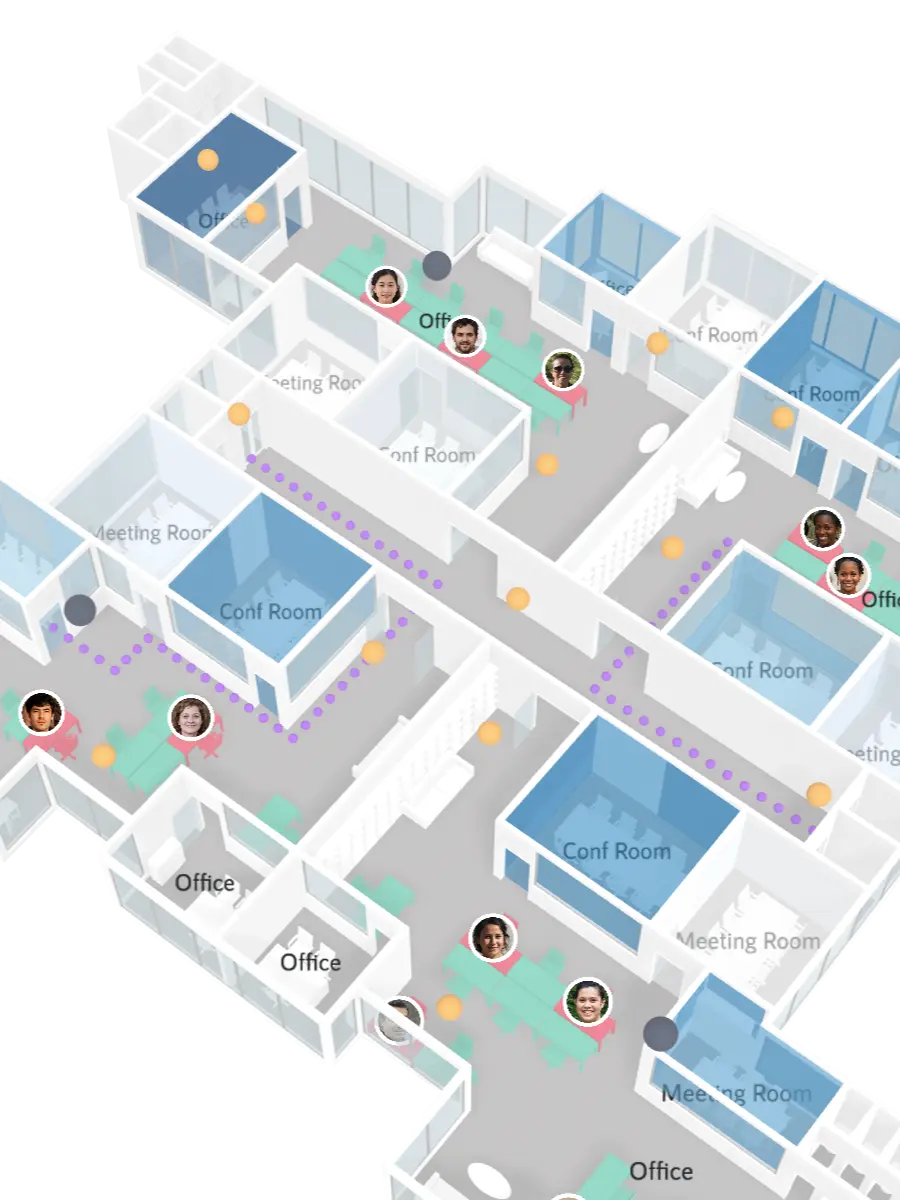
Bind any building or real-estate data, from units and equipment, to maintenance logs, IoT signals, energy metrics, occupancy, or surroundings data.

See live examples
API integration

Embed in your apps

Integrate via our typesafe Javascript SDK or NPM package, with a full API for loading spaces, managing data layers, handling user events, customizing the render, and computing spatial metadata and metrics.


Learn more
Read the docs
Details

Render blazing-fast, interactive 3D floor plans that give your users the spatial context they're familiar with.

Lightweight 2D plans with a clean visual style, free from the usual clutter found in standard CAD-like drawings.

Present or share a single floor without exposing the rest of the building, ideal for focused or permissions-based workflows.

Embed full buildings with fast-loading, interactive multi-floor models that give a clear overview of each level.

Display the building silhouette to provide context while keeping attention on a specific fully rendered area or floor being explored.

Use clean, unfurnished layouts when the goal is to focus on structure, layout, and the position of the space itself.

Furnish spaces with ready-to-use items like desks, chairs, cupboards, and other common objects, available out of the box.

Extend our catalog with your own 3D assets, added to your private library.

View the building in its immediate surroundings, including points of interest, roads, and transportation.

Use the same maps to visualize entire portfolios across regions or globally, with fast loading and smooth navigation.

Position points for sensors, devices, events, assets, room counts, occupancy indicators, and more. Each point supports metadata and styling.

Map rooms, units, and zones with adjustable opacity, height, and color to represent categories or states clearly.

Render linear elements such as routes, pathways, or building systems with precise spatial alignment.

Visualize continuous data such as temperature, occupancy, IoT readings, air quality, or sensor intensity.

Map desks, machines, or any equipment items for tasks like desk booking, maintenance planning, or machinery tracking.

Place icons to add contextual information. Icons remain readable regardless of rotation or camera angle.

Render images anchored directly to the floor plan, useful for signage, labels, logo maps.

Create customizable tooltips to display dynamic data on the floor plan, using templating approaches such as Handlebars or your own logic.

Capture user interactions by detecting where and what users click, enabling custom workflows and interactive experiences.

Adapt the viewer to your product by changing floor plan colors, backgrounds, and visual styles to match your brand and UI.

Control how spaces appear by adjusting elements such as wall height, and the visibility of windows, doors, and other features.

Map numerical data to colors for heatmaps and data layers using built-in best-practice scales or fully customized ones.

Provide context for visualized data with numerical, categorical, or icon-based legends directly on the floor plan.

Programmatically position the camera and store predefined viewpoints to create consistent spatial experiences in your app.

Generate screenshots programmatically or allow users to capture floor plan views directly from the viewer.

Walls are detected from floor plan geometry, and rooms are automatically extracted as closed polygons formed by those walls, making spatial data immediately usable in your application.

Extract spatial data such as equipment counts, furniture quantities, room areas, floor plate size, and total building area.

Enable cooperative gestures like protectScroll to require Ctrl/Cmd + scroll for zooming, preventing conflicts inside scrollable pages.

A full range of spatial capabilities

From rendering to data to interactions, everything you need to turn building data into product-ready experiences.

Smplrspace gives your team a complete set of spatial capabilities you can use out of the box.

Data visualization

Points layers

Polygons layers

Polylines layers

Heatmaps

Equipment, furniture

Icons layers

Poster layers

Space visualization

3D floor plans

2D floor plans

Single-level view

Multi-level view

Building shell

Unfurnished layouts

Equipment catalog

Custom 3D models

Single-building outdoor map

Portfolio-wide outdoor map

Custom UX

Tooltips

Click handlers

Themes

Custom views

Color management

Color scales

Legends

Programmatic control

Full camera controls

Screenshot API

Automatic walls & room detection

Data extraction and computation

Cooperative gestures

Smplrspace status

Fast, reliable, and ready for production

Smplrspace runs smoothly across modern devices, including smartphones, and scales from single units to global portfolios, integrating easily into your frontend stack.

Works with React, Next.js, Vue, Angular, vanilla Javascript, or any frontend technology you build on.

Load time
<2
seconds

for 37-storey, 500,000 sqft building

Platform uptime
99.99%

via globally distributed infrastructure

Production proven
4+
years

running in clients' real production deployments

The Smplrspace toolbox

Everything you need to turn floor plans into into data experiences.
A toolbox that brings your spaces into the digital world.

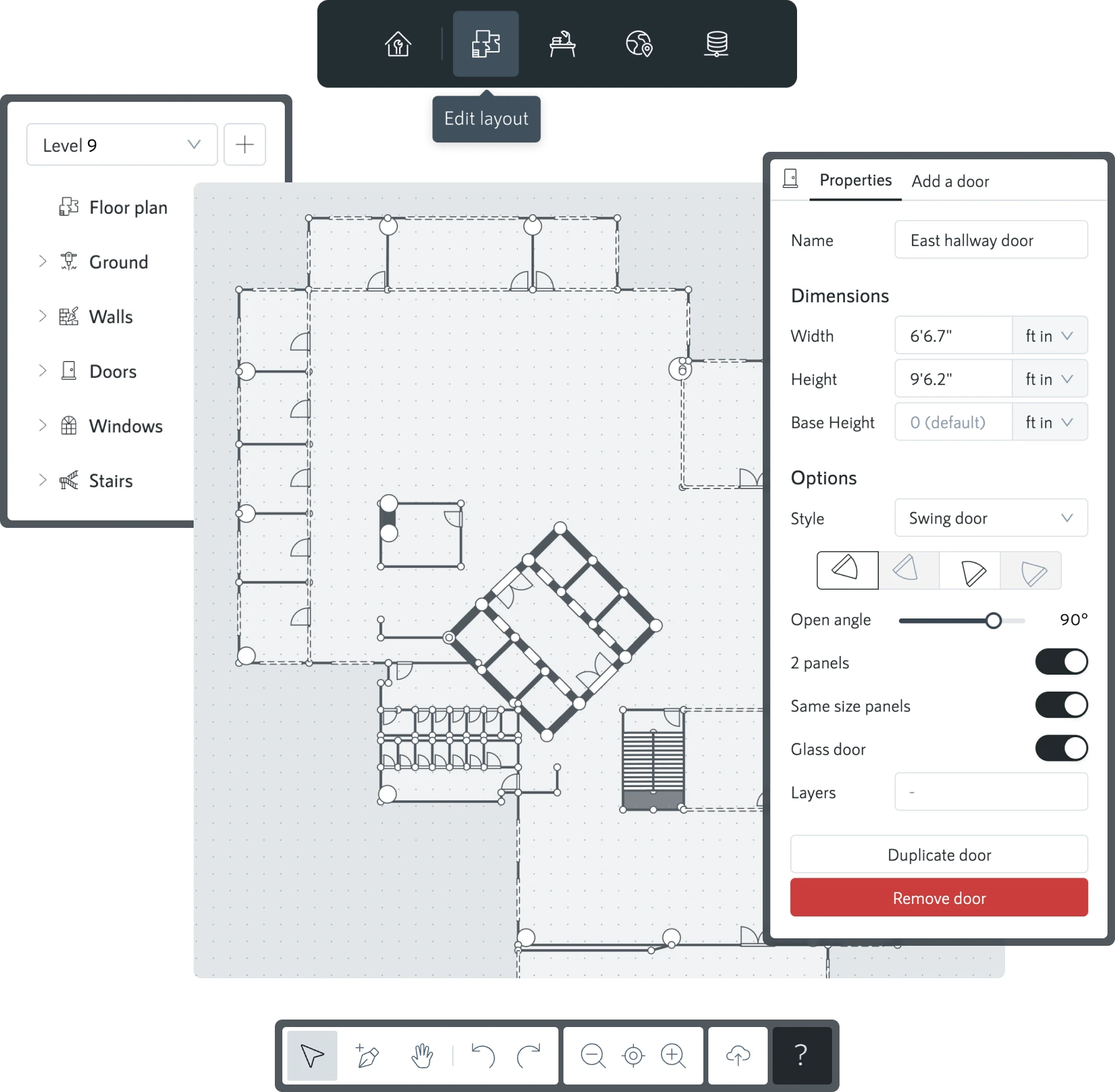
Layout editor
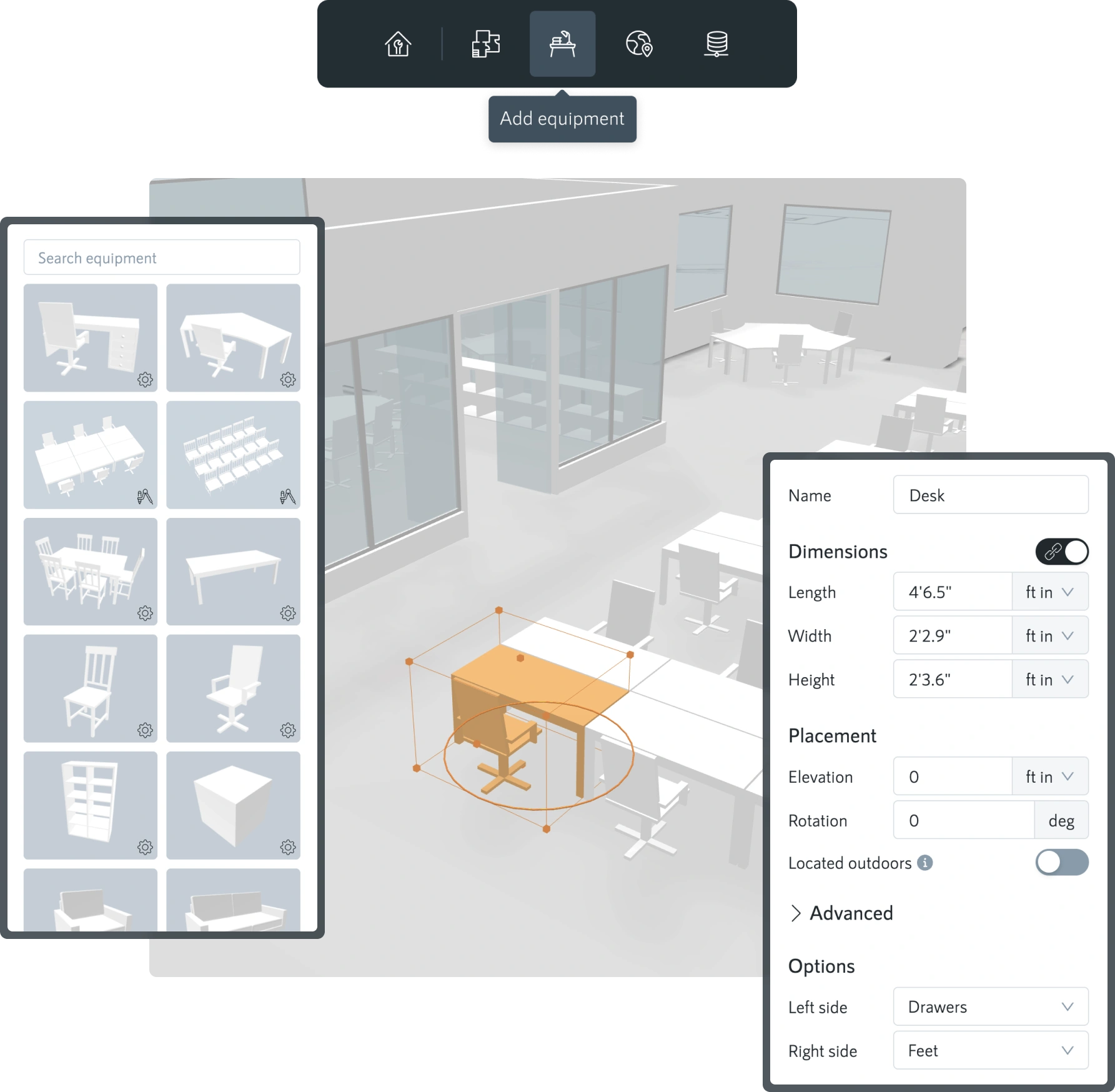
Equipment manager
Map placement
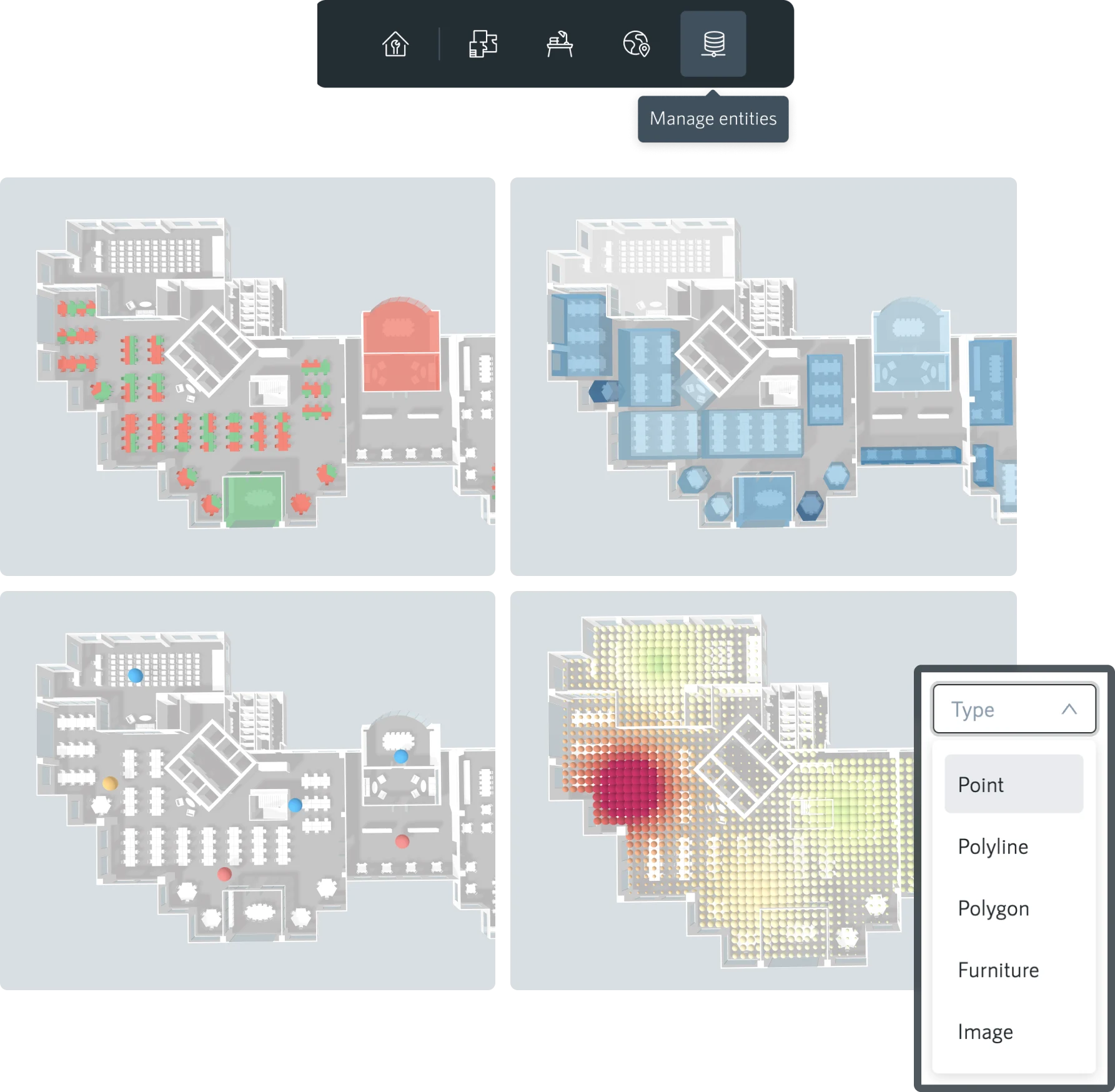
Entity manager

Layout editor

Upload floor plan images, set dimensions, and trace walls, doors, and windows with fast, precise tools. Snapping, clean geometry, and level-by-level editing give you an accurate digital replica of your space without any of the CAD or BIM complexity.

The layout editor runs in Smplrspace and can also be embedded in your product.

Check out tutorial

Equipment manager

Add equipment using our built-in library, including parametric models you can adjust to your needs. Upload your own 3D models to your private catalog.

Every object is stored with a unique ID and exact coordinates for clean, structured data in any workflow.

Watch quick demo

Map placement

Locate your space with an address or coordinates and place it on the outdoor map with the right orientation and camera view.

Our map viewer, built on top of Mapbox, shows the surrounding buildings and roads for instant context. Place multiple spaces to create portfolio-level maps.

Watch quick demo

Entity manager

Create spatial entities that represent the objects your application manages. Position them on the map or floor plan as points, polygons, or polylines with automatically assigned coordinates and unique IDs.

Manage entities through our APIs or sync them directly with Google Sheets.

These entities become the foundation for the data layers your application renders and interacts with through our APIs.

Watch quick demo

Integrating Smplrspace

Smplrspace integrates easily into any web app. Load spaces, connect data, and build interactive spatial experiences with few lines of code via our JavaScript and TypeScript APIs.

Embedding Smplrspace

Integrate the Smplrspace viewer through our Javascript or TypeScript package and load spaces directly inside your application. Control how the viewer initializes, how it looks, and how it fits into your product’s interface.

Embedding guide

Full programmatic control

Use the API to manage navigation, visibility, and interaction. Move the camera, switch levels, highlight entities, or adjust the interface so the viewer behaves exactly as your workflow requires.

Viewer controls

Data layer management

Create and update points, polygons, polylines, dotted polylines, icons, posters, equipment, and heatmaps. Render your data directly on the space, driven by your backend and updated in real time.

Data layers

Events system

Listen to clicks, hovers, selections, camera changes, and other interactions. Events let your product respond to user behavior and power your own logic or UI.

Events guide

Object & space metadata

Access IDs, coordinates, geometry, and floor information for any entity, enabling spatial computations, aggregations, and insights in your product.

Metadata access

Customized UIs

Combine events and programmatic controls to design your own panels, workflows, or interactions around the viewer. Smplrspace handles the rendering; your product defines the experience.

UI/UX tooling
Privacy and security

Private by design, secure by default

Smplrspace is built with a privacy-first architecture. Your data stays in your systems, and the platform only renders what your app sends. The visualized data is not stored, and doesn't even transit through our servers.

Security guides

No data ingestion

Your building data and business logic never leave your environment. We only store the floor plans you upload and nothing else.

Client tokens

Every request to load a space requires a client token. They are managed inside the Smplrspace app and you can revoke or rotate them anytime.

Authorized domains

Control which domains are allowed to request your floor plans. Only requests coming from your approved domains will be processed.

Content Security Policy

Smplrspace is compatible with strict CSP environments. Add our CSP directive to ensure the viewer loads correctly within security standards.

Customer testimonials

What our clients say

Product and engineering teams rely on Smplrspace to power their spatial products, delivering fast, reliable user experiences, without maintaining complex infrastructure.


Working with Smplrspace's product was definitely a beginner friendly experience. Their support tackled each problem with impressive insight and provided clear solutions that resolved issues on our end. They made sure that we understood how to use their product and we highly appreciate their fast response.
Mikee Ojastro
Full Stack Engineer
I am currently utilizing Smplrspace's services for a single-page web application, which has been a fantastic experience so far. The performance and features provided by the Smplrspace platform have significantly contributed to the success of our application.
Tommaso de Chirico
ICT Developer
Smplrspace has been instrumental in helping us build a cutting-edge 3D visualization module for our product. Their prompt technical support and seamless integration assistance made the development process smooth and efficient. We truly appreciate their expertise and collaborative approach.
Rupesh Singh
Director of Engineering
This product is a breath of fresh air. I’ve been able to implement the majority of our requirements in just a few hours with Smplrspace.
Sean O'Callahan
Senior Software Engineer
Effective visualization of occupancy has helped our client achieve US$ 2.4M in savings over a one year period.
Deborah Noller
CEO, Switch

Start free and scale as you grow

Start building with Smplrspace for free. Explore the SDK, create your first three spaces, and test integrations without commitment. Review our pricing or dive straight into the docs and start building.

Free to start — 3 spaces included, no credit card required

Fully self-serve — digitize your spaces, and integrate at your own pace

Enterprise ready — volume discounts, white label, and priority support

Start freeView pricing

Developer quickstart

A practical starting point for developers new to Smplrspace.

Learn more

Have questions?

Contact our team if you have any questions about the platform, services, or pricing.

Talk to us
Join our newsletter

Be the first to hear about product updates, new features, and what’s next for smarter property data.

Thank you! Your submission has been received!
Oops! Something went wrong while submitting the form.
Redefining communication about spaces.
Register
Pricing
Platform
Interactive 2D & 3D floor plansReporting & business intelligenceIntegrate & embed SmplrspaceReal estate portfolio digitization
Services
Floor plan digitizationData mapping
Resources
Customer testimonialsHelp centerSupportWhat's newSystem status
Developers
Developer quickstartDeveloper docsAPI referenceLive integration examples
About
CompanyCareersContact us
© 2026 Smplrspace | All rights reserved.
Privacy policyTerms of useCookies
Smplrspace status